What BrightMind does
A phone app that helps you turn a busy head into a next step. Talk or type, get a task saved, and pick it up again when you are ready.
What BrightMind is
BrightMind is a mobile app for iPhone and Android. There is no web or desktop version yet. You work with it through text chat and voice calls, so getting unstuck can be as quick as saying what is on your mind.
A brain dump is exactly what it sounds like: you empty everything rattling around in your head into one conversation, in any order and any mess. BrightMind sorts it with you into tasks with days and times, so nothing depends on you remembering it.
What makes it different
Four things separate BrightMind from a chat app you can talk to:
- Tasks that get saved. What you agree on in a conversation becomes a real task with a title, a day, and a time if you want one. You can find it again on Home, open it, change it, or check it off.
- Memory that carries over. BrightMind learns from your conversations, so tomorrow it can pick up where today left off. Past conversations also stay searchable.
- Automations. Ask once and it keeps happening: a daily check-in, a Friday review, a call on Sunday, delivered as a message or a call. See Automations.
- Calls BrightMind can make to you. Beyond on-demand calls, you can schedule a call for later, once or repeating, and BrightMind rings you.
Start with built-in tasks
You can start right away with BrightMind's own tasks. No other account, no setup, no third-party app needed. Onboarding sets the built-in task store as the default, and everything you save lives inside BrightMind until you decide otherwise.
If you already use Todoist , TickTick or Google Tasks, you can connect it in Settings and send new tasks there instead. One task manager is active at a time.Google Calendar is a separate, optional connection for your events.
Try one small thing
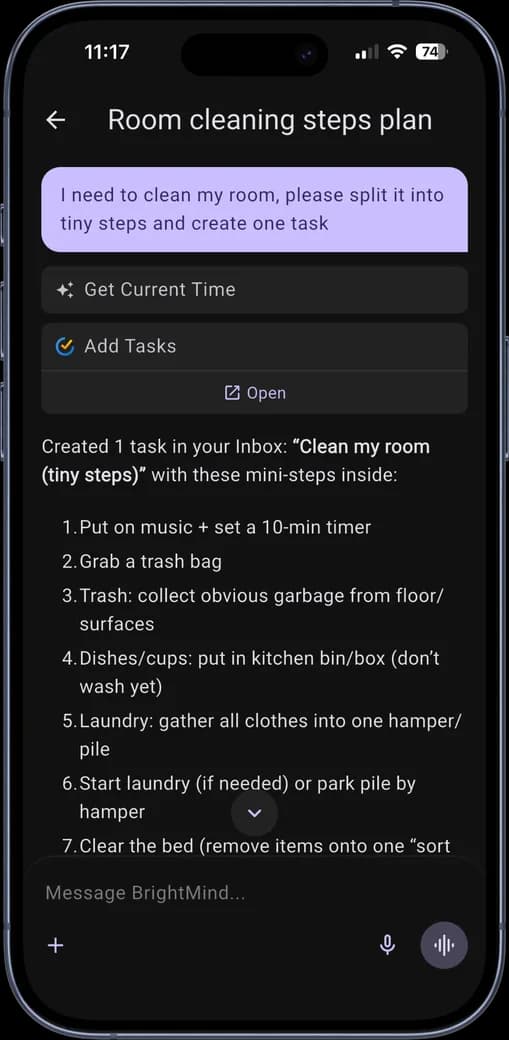
Open a conversation and type: “I need to clean my room, but I don’t know where to start. Help me choose one small step.”
If a step feels useful, ask BrightMind to save it as a task, then check the task details to make sure it understood you. Here is what a conversation like that can look like:
Want the full walkthrough? Follow Save your first task.
Plans
Free and Plus each come with a weekly allowance of messages and call time that refills every Monday, and Plus gives you more. A few features, like scheduled calls, can be part of Plus. See Free vs Plus for the details.
Where to go next
Pick the card that matches what you want to do right now:
Community & updates
Join the BrightMind Discord from Settings to share ideas, ask questions, or flag something that isn’t working. For what’s shipped recently, see the changelog.